Shiny Tech Stack
This book contains the technology used to run all things ShinySpace. Usually it will be free and open source software.
- Virtualisation
- Networking
- Web Hosting on Webvm1
- Domain Registration and public DNS
- Ansible
- NFS - Network file system
- Python and venv
Virtualisation
Currently, ShinySpace runs on Proxmox. Proxmox is a very handy tool to manage large numbers of virtual machines. The web-UI allows a quick overview of resource usage, and makes moving around VM's easy.
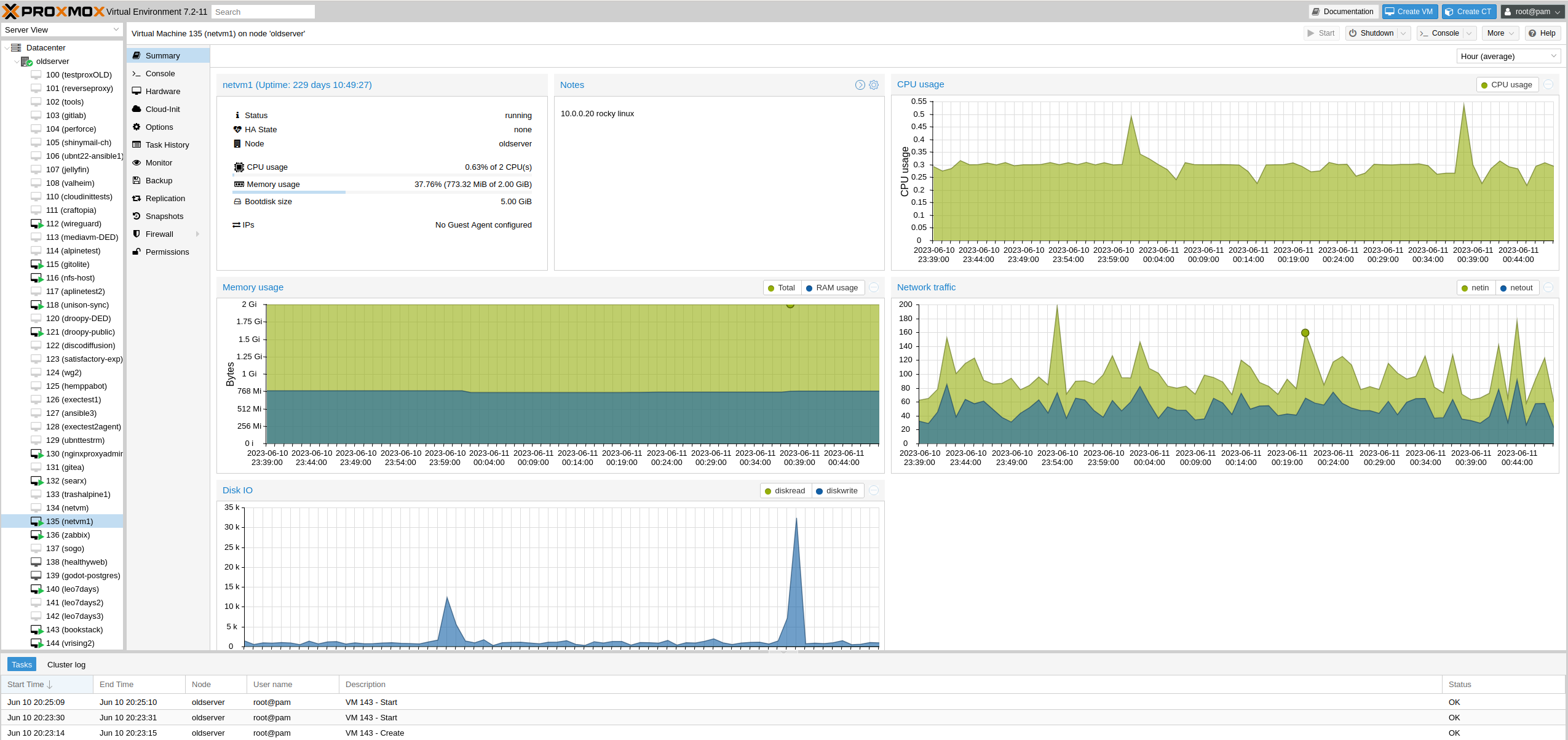
To be specific, ShinySpace uses Proxmox Virtual Environment - an open source Linux "distribution" based on Debian. It's free to use, but the free version comes with a slightly annoying popup on logging in (which can be disabled) and uses the "unstable/testing" repositories. For a bigger environment with more mission-critical services, the enterprise license is recommended, and actually very affordable at around $100 a year.
Proxmox also comes with qemu, which includes a nice command-line interface for creating and configuring VMs. This CLI is used by Ansible to quickly create new VMs.
The hardware Proxmox runs on is an old gaming PC - the GPU was removed to save power, and with time some more RAM and a good SSD for the virtual machines was added.
Networking
Currently, Networking at ShinySpace consists of 3 parts:
Netvm1: Virtual Machine running DHCP, DNS and related scripts.
Netvm1 is a Rocky Linux VM used to manage most of the rest of ShinySpace. The most important services on it are DNS (bind/named) , DHCP Server (dhcpd, the ISC dhcp server) and Ansible.
Rocky Linux was mostly chosen out of curiosity, this might change to either debian or Alpine Linux in the future.
EdgeRouter 5X: 5 Port Router for connecting devices, Wifi, and for managing port forwards.
The small EdgeX used to be much more important in the past, with it's dhcp server and port forwarding being the central piece of ShinySpace. Since the introduction of Netvm1 (and Webvm1) it has not seen much use apart from occasionally opening a new port though.
It supports gigabit ethernet and one single PoE port for a Wifi device.
ISP Provided Router: This is the device that actually connects to the internet.
The current ISP provided router has a 10Gbit/s fiber connection to the internet, a single 2.5Gbit/s ethernet connection, and several 1Gbit/s ethernet ports and Wifi. On this device there are also some port forwards, mostly just forwarding things to the EdgeRouter 5X.
Web Hosting on Webvm1
This website, as most ShinySpace websites, is served via an Nginx Reverse Proxy. This is useful because it allows ShinySpace to offer several different websites and services all on one port (443 for https) and IP.
This works as follows:
The website you type in your browser (for example wiki.shiny.space) always points to shiny.space - so blog.shiny.space, factory.shiny.space etc all go to the same IP Address.
From there, the port forwards send the requests to the Nginx Reverse Proxy running on Webvm1. That proxy can actually read which address you typed in, and uses that information to redirect your request to the proper place - this can either be itself if the website you requested is on Webvm1 too, but can also be a completely different virtual machine, as the one you're currently reading - this is running on a VM called bookstack.
A huge advantage of such a setup is also HTTPS - it allows secure connections into ShinySpace to one single point, meaning there is no need to manage several different certificates for all the different services. The connection to Webvm1 is secure, and after that it's ShinySpace's choice of how to continue the request - some services insist on having their own certificate, so the HTTPS connection is passed on. Other services don't care as much, so we can terminate the HTTPS at Webvm1 and just use plain old HTTP inside the ShinySpace network, since it's supposed to be secure.
How this is achieved is a TODO, the configuration files should show up here later.
Domain Registration and public DNS
This is the one service that is not free and open source in ShinySpace:
To make sure requests for any ShinySpace domain or subdomain lands at the correct place, ClouDNS contains the proper entries. So any time you type shiny.space in your browser, that browser will ask ClouDNS for the IP.
For convenience, shiny.space is also registered directly with ClouDNS. The service ClouDNS provides is very solid, easy to use, and flexible. For a current $30 per year for the DNS service, it is a good deal. But the domains themselves cost extra: shiny.space costs another $30 per year, whereas other domains are usually only $12 per year. (subdomains like this one, wiki.shiny.space, are free and unlimited in a domain such as shiny.space.)
Ansible
ShinySpace's network and virtual machines are managed by Ansible - this allows quick and easy creation of new virtual machines, which then immediately get added to DHCP and DNS configurations.
This means that each virtual machine will have it's own, permanent IP Address, which instantly gets added to DNS too to make both managing the VMs via SSH and adding them to various configuration files (such as in Webvm1) very simple and convenient.
Ansible also manages the SSH keys on all VMs - if the SSH keys need to be changed in any way, a single playbook can update all VMs so very little manual work is required.
NFS - Network file system
Shiny Space finally has a network file sharing system that seems like a solid setup. Previously, the issues were:
- we don't want to share anything from the Proxmox installation itself, because a Hypervisor should only do one thing: Host VMs.
- If we set up a VM and allocate it storage, that storage will be included in backups, and is hard to move from one VM to another if we need to change the setup in the future. Having to make 2 Terabyte Backups regularly is not fun.
There are possibilities of not including the network share in backups, and there are ways of switching the allocated storage from one VM to another while keeping the system seperate, but... Complexity demon smiles.
So we've landed at the current option:
Direct Disk Passthrough. https://pve.proxmox.com/wiki/Passthrough_Physical_Disk_to_Virtual_Machine_(VM)
This allows us to give direct acces to a physical disk to one of our VM's. Since it's a physical disk, it's very easy to disconnect it from one VM and attach it to another! Also, while by default it IS included in backups, it's way easier to just remove it, take a backup of the very small nfs host vm, and reattach it.
The nfs host vm is a small Alpine Linux VM with nfs-utils installed. Available NFS "disks" are directories in /storage/ , made available with entries in /etc/exports. This is easily managed by Ansible - if we need to connect a new host to our NFS, we can simply add a line in /etc/exports that contains the host's IP and the target directory, for example /storage/media.
On clients, it should be easy to manage as well - all we need is an /etc/fstab entry and it should be mounted automatically on boot.
One issue is when restarting the hypervisor - for the fstab mount to work, both netvm1 and nfs host must be running already. Conveniently, Proxmox offers a "boot order" option, where we set netvm1 to "1" to start first, nfs host to "5" to leave some room, and everything else has no value (or maybe "50" later for a default).
Python and venv
Python is supposed to be simple. but if you want your scripts to not break at arbitrary times, you'll need to deal with some complexity. this page explains it mostly specific to red hat enterprise linux, but it should be similar on other distros.
problem
First step when using python is imply using the system provided python. Linux distributions come with packaged python - red hat specifcally with python3 (the system default - for RHEL 8 it's python 3.6, for RHEL 9 it's python 3.9) and python36 (3.6) , 38, 39, and python3.11 specific packages.
This works fine for simple scripts without dependencies - likelyhood of something breaking when updating is extremely low while the major version stays static. When updating from RHEL 8 to 9, there can be some breakage - but a few small simple scripts will be manageable.
However, if your scripts get bigger and start including some dependencies, this stops being a good option. On a RHEL version upgrade, there's a good chance your script breaks, and dependencies might change or become unavailable - leading to a lot of effort, while you're probably already very busy with the server upgrade itself! you might get away with running your scripts with the previous standard version for a bit if available, but most likely any dependencies you had aren't available in the repos anymore, and installing system wide through pip is very much discouraged, and might install different versions of those packages too, breaking your scripts.
So we've established to not use the system default for anything bigger than the simplest of scripts. what if we just use a specific python of the available ones, python3.9 for example?
The biggest issue with that is that while most dependencies might be available as packages on the default, the 3.9 specific versions of the packages are not. only a small subset of packages are available in 3.9 on a RHEL 8 system. this brings us to the issue of system wide installation being discouraged again. so if you need any dependencies, do not use any system provided python.
With this, i think it's reasonable to say we cannot use any system provided python, and that likely means we need a venv.
venv
sidenote: a venv is a virtual environment - a place you can install your python dependencies with pip, without affecting any of the system wide packages. this venv can be updated and modified separately from the system python environment, so updates of our server do not break scripts.
The thing with venv is - you need to activate a venv before running a script. there are many ways to activate a venv:
- interactively: in bash, you can run something like "source ./venv/bin/activate" and you're in the venv.
- wrapper script: a small bash script that does "source ./venv/bin/activate" and then runs your python script
- shebang line: the first line of your python script can be #!/path/to/your/venv/python3.9 to run it with the venv
- python sys.path: you can tell python where to look for dependencies
We'll look at the problems each solution has and pick one.
interactively: i want my team to be able to run my scripts without having to enable a venv first - it has to be automatic.
Wrapper script is a common option - a small bash script that does the "source /venv/activate" bit and then runs your script will make it use the venv. but it feels stupid. for every script i want to run, i need a different script that calls it? i feel like there has to be a better way.
shebang line: this would work well if your venv is always available in the same path. however, i want to be able to clone the git repo and run it in my user directory, using a different venv while developing or updating things - so we cannot hardcode an absolute path to our venv. and according to chatgpt, the shebang line does NOT support relative paths. so we cannot use this option.
python sys.path: this is set from within the python script. so when running the script initially, it uses the system provided python, only later changing the path to see dependencies in your venv. Running system python but grabbing dependencies from non-system venv is just asking for trouble and can introduce all kinds of compatibility issues if you're not careful. this is a non-option too.
conclusion
And would you look at that - all the options are bad. I cannot believe it's this hard to run python scripts that don't arbitrarily break. But despite that, i prefer python to bash or perl, so i'll pick the least bad one - and to me, that appears to be wrapper scripts. yes having two files sucks, but it's simple enough and it'll work reliably.
additional info for why we don't install system wide:
many packages in distributions rely on the system python packages and do not bring their own venv. If we mess with system python, we mess with system packages. usually system packages are cool and stable and work well, so if we do non-package stuff we do it separately.
Fun facts:
relative path shebang question on stackoverflow, with people coming up with all kinds of weird hacks: https://stackoverflow.com/questions/20095351/shebang-use-interpreter-relative-to-the-script-path